When AI output goes wrong, the prompt takes the blame first and the model second.
Both are usually innocent.
The more common cause is that the AI was missing a fact, or held three versions of it with no way to tell which one is current. A better prompt cannot add information that is not there, and a smarter model reasons more elegantly toward the same wrong answer.
The obvious fix is to give the AI more, and this is where things get unforgiving.
A model with too little context invents what it does not know, fluently enough that you may not notice. A model with too much becomes measurably less accurate, and it pays for that decline with your context window.
Context engineering is the practice of managing this tradeoff deliberately.
In this article, we'll show you how to tell which way your context is failing, what your AI should remember, retrieve, and ignore, and how to keep the whole setup honest as your work moves on.
Key takeaways
- Context engineering is the practice of deciding what an AI should know while it does a task, covering instructions, documents, examples, memories, and tools.
- Prompt engineering shapes the instruction, while context engineering supplies the information the instruction runs on.
- Research from Chroma and the "Lost in the Middle" paper shows model accuracy drops when context grows too large or the relevant fact sits mid-input.
- Context splits into four layers by durability. Durable facts persist in files like CLAUDE.md, project and task context stays scoped, and fast-changing evidence gets retrieved on demand.
- A company brain MCP acts as a single retrieval layer between an AI agent and company tools, returning one synthesised answer instead of raw search results.
- Slite Agent works as this retrieval layer, and reached 90% accuracy at 39 seconds average against 68% at 102 seconds for Claude wired to eight separate MCPs.
What is context engineering?
Context engineering is configuring which instructions, information, examples, memories, and tools an AI receives, when it receives them, and what stays out. Simply put, it is the practice of deciding what an AI should know while it is doing a task.
That includes the prompt, but also the:
- instructions it carries between sessions
- the documents it can retrieve
- examples of good work
- memories about you
- previous messages
- tools
- permissions
- any new information it discovers along the way.
The goal is to give the AI the smallest trustworthy working set that is enough for the task in front of it.
But why smallest? Isn't more context better?
Not usually. Anthropic calls context a finite resource and recommends finding the smallest possible set of high-signal tokens that improves the chance of the outcome you want.
"Smallest" doesn't mean forcing every brief into three bullet points, though. A contract review needs the full contract and important bylaws. It simply means that every addition should have a reason to be there.
How is context engineering different from prompt engineering?
Prompt engineering is about what you ask the AI to do. Context engineering is about what the AI knows while it does it. A better prompt can sharpen an instruction. It cannot add a fact the AI doesn't have, or tell it which of three conflicting versions of that fact is current.
Take a simple example:
"Write a project update for the leadership team. Keep it below 300 words. Start with the decisions we need to make."
That is a clear prompt. Whether the AI can follow it depends on context:
- which project,
- the latest status,
- approved decisions vs. ideas someone floated in Slack three weeks ago,
- what leadership cares about,
- and what a good update looks like.
You can rewrite the prompt ten times. If the context is wrong, all ten versions will be confidently, politely wrong.
The 4 types of context
A good context engineering setup requires you to understand that there are four different types of context based on their relevance to the task and their durability.
- Durable context travels across many tasks: your role, stable policies, vocabulary, recurring constraints, and proven preferences.
- Project context survives across sessions but stays with the project: the objective, owners, decisions, source documents, and open questions.
- Task context belongs to this run: the request, audience, inputs, format, deadline, and definition of done.
- Retrieved evidence is loaded when needed: the latest metric, current policy, relevant customer call, or live database record.
The separation matters because these layers decay at different speeds. Your company vocabulary may remain useful for a year. This week's project status may be wrong by Friday.
How do you decide what context to persist, retrieve, or leave out?
For any piece of context, ask two questions:
- How relevant is this to the work?
- How quickly can it change?
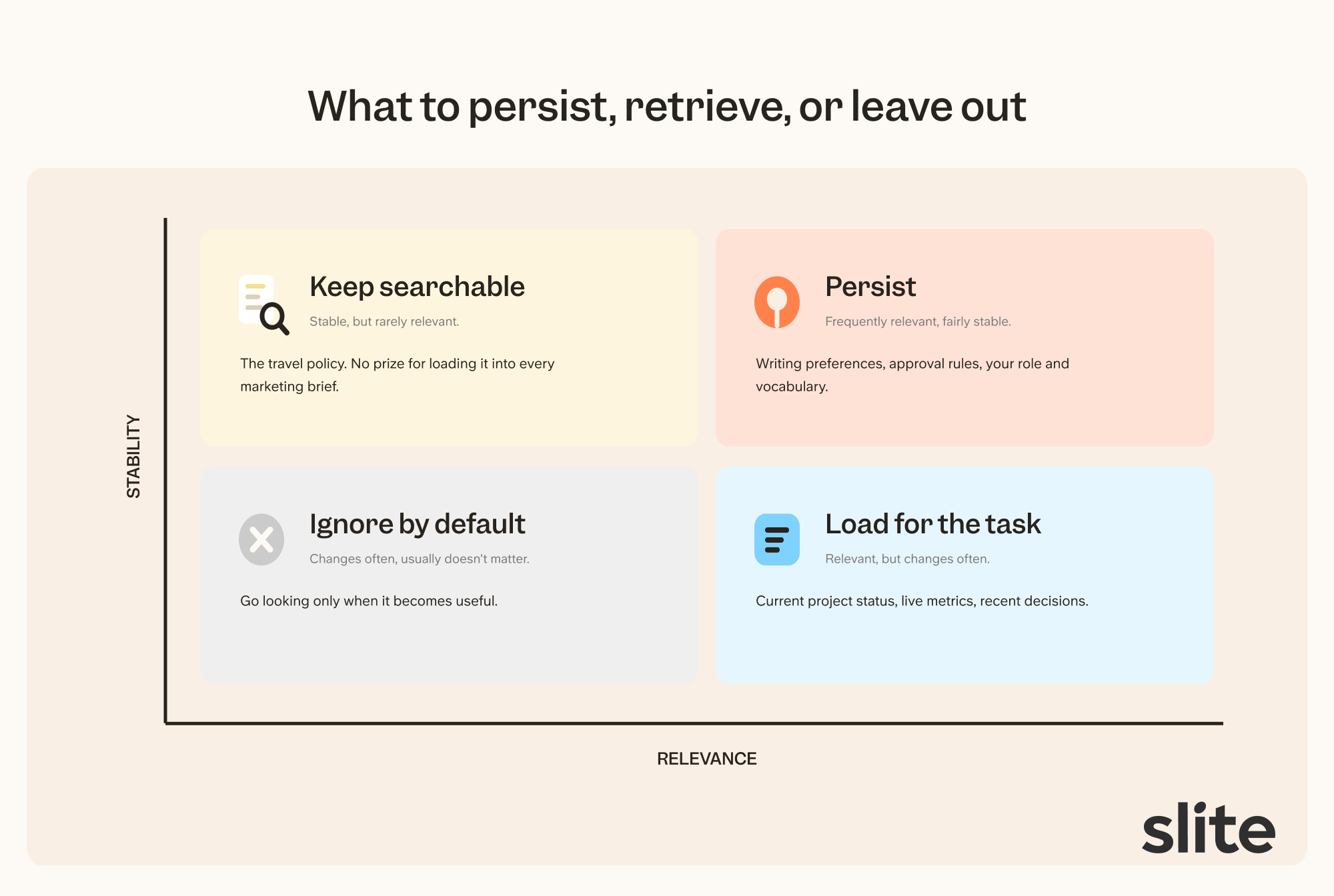
- If something is frequently relevant and fairly stable, it can persist. Writing preferences and approval rules fit here.
- If it is relevant but changes often, retrieve it for the task. Current project status, live metrics, and recent decisions should not be embalmed in permanent memory.
- If it is stable but rarely relevant, keep it searchable. There is no prize for loading the travel policy into every marketing brief.
- If it changes often and usually doesn't matter, leave it out by default. You can always go looking when it becomes useful.
How do you set up context engineering?
Pick one task you do often and can judge well. Build the setup around it in this order.
Step 1. Write your durable context down once
Create a CLAUDE.md or AGENTS.md file, or open your tool's custom instructions. Write down the facts about you that stay true across every task:
- your name, role, and team
- how you prefer to brainstorm and work through problems
- how much detail you want in answers
- how often the AI should ask questions before assuming
Every session now loads this automatically, and you stop re-explaining yourself in each new chat. If you work in Claude Code, we've documented 18 workflows that run off this file.
Step 2. Ask the model what it needs
Before running the task, ask the model what information it would need to produce a great output.
Models name their own blind spots well when asked directly.
Its answer becomes your context checklist for this task, and it will be shorter than what you would have attached on instinct.
Step 3. Connect a company brain MCP as your context agent
Most items on that checklist are company knowledge that changes too fast to store anywhere permanent. Connect a company brain MCP and instruct your model to query it whenever it hits a gap.
The company brain searches your docs and tools, then returns one synthesised answer with sources, so raw search results never enter your context window.
The Slite Agent works this way, and it outperformed a stack of separate MCP connectors on both accuracy and speed in a benchmark we cover at the end of this article.
Step 4. Add direct MCP sources for exact records
A synthesised answer is the wrong tool when you need an exact number. A revenue figure must come from its system of record, your billing tool, not from a summary of it.
Connect MCPs for the tools that hold your records, so the model fetches the current value on demand instead of you pasting it in before every run. Most setups end up needing both MCP and RAG, each for a different job.
Step 5. Happy with the output? Save the setup as a skill
Write a short instruction that lists which context to gather every time this task starts, and save it wherever your tool stores reusable prompts.
The model now reminds itself to collect the same context on every run, and your thirtieth run starts as well-equipped as this one.
Step 6. Unhappy with the output? Debug one variable at a time
Check the remaining context window first. A model near its limit drops accuracy without warning you.
Then give the same context to a stronger model. If it fails the same way, the context is the problem, not the model.
Now fix it as a loop. Change one thing, rerun, and compare.
Removing one stale document is a single change. Swapping the model and the sources at the same time is not, because you cannot tell which change did what.
Keep a change when it improves the output twice, then repeat until the output passes. We go deeper on diagnosing context failures later in this article.
Context engineering for AI agents
Context engineering for AI agents means managing not just the context you give an agent upfront, but the context it generates as it works. Unlike a chatbot, an agent adds every tool call, search result, and intermediate step to its own working memory, so a long-running agent gradually buries the task under a record of how it got there.
Your job shifts from assembling the right context upfront to controlling what accumulates during the run.
You can control it by following a few steps:
- Make it retrieve instead of preload. Point the agent at an index or a company brain and let it pull detail when a step needs it. A fact fetched at step nine costs nothing at steps one through eight.
- Make it write state to files. Instruct the agent to keep its plan and findings in a working document, not in the conversation. When the context window fills or resets, the task survives.
- Make it compact. Tell the agent to periodically summarise its history into decisions made and questions still open, then continue from the summary.
- Give noisy work to subagents. A research subagent runs forty searches and returns one paragraph, so the noise dies with it. Without that separation, a multi-agent system is just several computers collaborating on one very long chat log.
The stakes are higher than with a chatbot because an agent acts on its context. And a wrong fact in an agent run shapes every action after it.
How much context is enough?
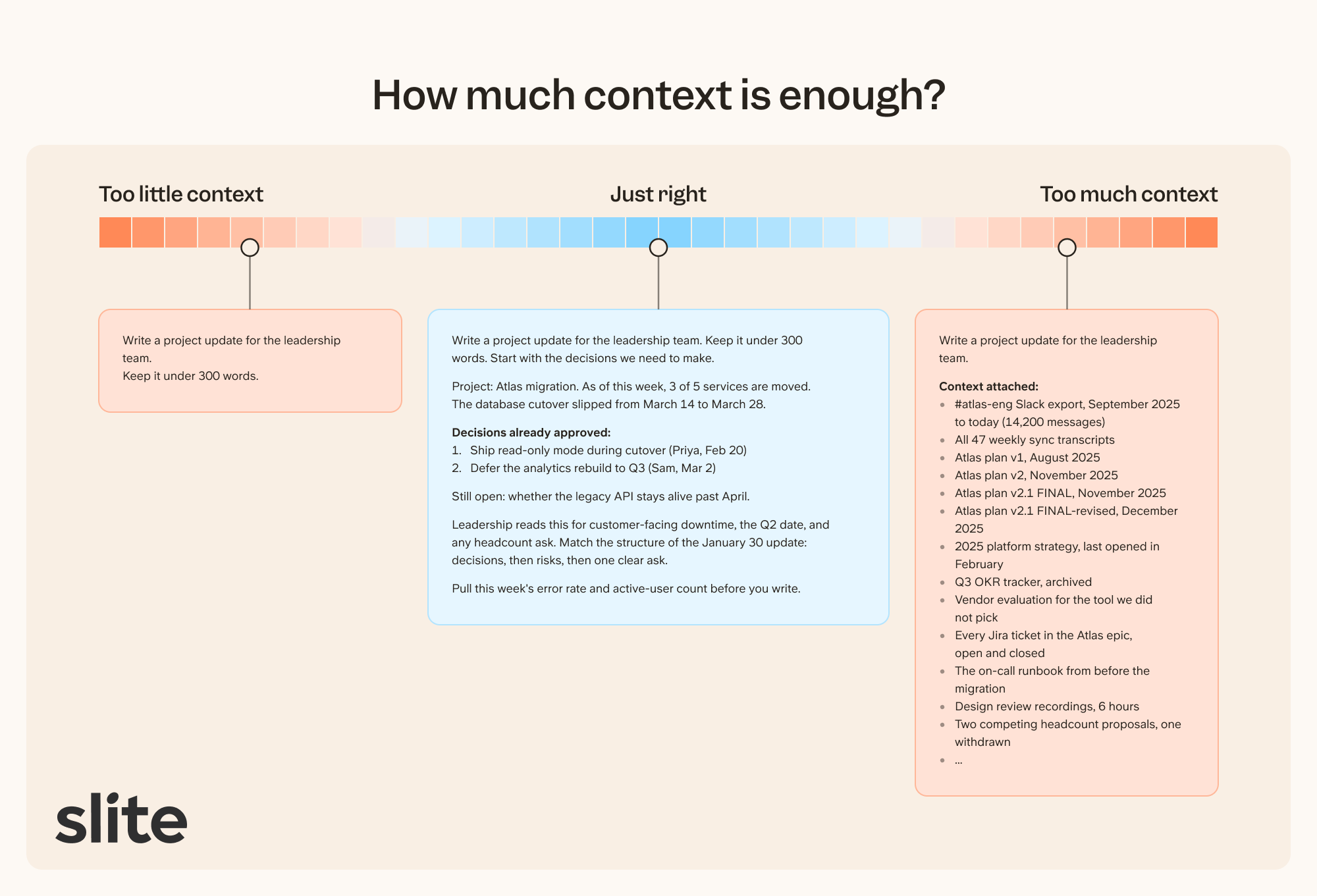
Insufficient context causes AI agents to hallucinate in specific tasks. And adding too much context causes AI agents to get confused and leads to context rot quickly.
Giving insufficient context
If you just tell AI to 'write a project update,' it wouldn't know the audience, decisions, the blockers, or what changed. So it'll reach for generic templates, write in cookie-cutter professional voice, with likely hallucinated facts.
Giving too much context
If you tell AI to 'write a project update' and feed it:
- 6 months of Slack history,
- every meeting transcript,
- the original plan, the revised plan, and the revised revised plan,
- a strategy document everyone stopped using in February.
The answer becomes specifically wrong because it makes no distinction between outdated information and fresh information. You might notice that an old decision gets pulled into the proposed draft, or a discarded option shows up as active.
Chroma tested 18 models on controlled tasks and their results found that models do not use their context uniformly. Instead, their performance grows increasingly unreliable as input length grows. Moreover, when your context window nears full, the AI model starts to forget information from the beginning of the conversation.
So, they coined the term Context Rot to describe the context degradation in LLMs as their context window starts to fill up. A large context window tells you how much a model can accept, not how much you should send.
The "Lost in the Middle" paper found something similarly annoying. Models often performed better when the relevant information appeared at the beginning or end of a long input, and worse when it sat in the middle.
How do you diagnose a context engineering problem?
When the output is generic, wrong, or strangely focused, work backward from it. Find the first sentence that broke and ask: what would the AI have needed to do this part well?
That missing thing is usually one of five kinds of context:
| Gap | What is missing | What the failure feels like |
|---|---|---|
| Business | Product, customer, vocabulary, policy | The answer is plausible but doesn't fit your company |
| Situation | Current state, recent decisions, owners, constraints | The answer belongs to last month |
| Knowledge | Facts, documents, data, research | The support is vague, thin, or invented |
| Taste | Examples, preferences, anti-examples | The work is correct and still feels wrong |
| Success | Audience, purpose, format, acceptance criteria | You receive a good answer to a different question |
Taste and success are the two people underestimate.
"Make it sound like me" is barely useful context.
- Which parts of your writing should it copy?
- Which parts are accidental?
- What would you never publish?
A few examples and one clear anti-example tell the AI more than a paragraph of adjectives about your tone.
The AI also needs to know what the output is for.
"Summarise this research" could mean:
- help me decide,
- help me teach,
- help me persuade,
- or help me remember.
All of the above are ultimately different summaries.
The four ways context fails
When an output goes wrong, the context usually failed in one of four ways:
- Something important was missing.
- Something irrelevant was crowding it out.
- Something old or contradictory was allowed to compete with the truth.
- The context was accurate, but wrong for this audience or task.
Only the first problem is fixed by adding more.
At the individual level, these are mistakes you can fix by editing your setup.
At the company level, they compound into something harder to see.
Three teams document the same policy at different times. Nobody retires the old versions. The AI retrieves all of them because there is no single source of truth telling it which one reflects today's reality.
This is context rot at the organizational level, with a longer half-life than the token-level phenomenon researchers measure in long inputs. Stale documentation is harder to detect than stale tokens because the documents still look authoritative. A wiki page from 2024 reads exactly like a wiki page from last week.
When context isn't the problem
Give the same prompt and the same context to two or three different models. If any of them produce what you wanted in one shot or with minor edits, the context was fine.
Try a different model or break the task into smaller pieces. If all of them fail the same way, something is off about the context.
If the AI had the right facts but could not reason through them, that is a model problem.
If it knew what to do but could not access the source, that is a tool or permission problem.
How do you maintain context over time?
Every entry was true on the day you saved it, and nothing marks the day it stops being true. This is knowledge drift, and a stale fact doesn't announce itself in the output, so you maintain on a schedule instead of waiting for a failure you can see.
Maintenance happens at three moments. This is how you can maintain it:
When you save
Put a date on every fact and decision, so you and the model can discount it later. When a new version of a document replaces an old one, mark the current version and archive the old one, because the AI has no other way to know which of two conflicting documents wins.
On a schedule
Once a month, read everything the AI has stored in memory and delete what no longer holds. If your tool cannot show you its memory, stop letting it save any. When a project ends, archive its brief and working documents out of retrieval, so the next project doesn't inherit its conclusions.
When a wrong output surfaces
Trace the stale fact to the document or memory that supplied it and correct it there. A prompt workaround hides the problem from you while every other task keeps using the same source.
The full routine costs about ten minutes a month, and saves you far more than that.
Having a company brain MCP is the best way to engineer context effectively
A company brain MCP is a single retrieval layer that sits between your agent and your company's tools. Your agent queries it mid-task for the specific details it needs, and the MCP searches across your docs, Slack, project tools, and CRM in parallel, returning one focused answer.
The Slite Agent works this way. Your main agent sends a question to Slite, and Slite searches across your knowledge base and connected tools, returning a synthesized answer with source citations. The retrieval noise stays outside the working memory. Your agent gets the fact it needed. That only holds if what it retrieves is current, which is the case for a self-maintaining knowledge base.
This changes two things in practice.
- Your agent can assess its own context gaps before it starts filling them with hallucinated filler. It knows what it knows and what it needs to ask.
- Your context window stays focused on the task. Every MCP call that returns raw documents eats tokens and buries signal. A knowledge MCP that does the synthesis first means your agent spends its context budget on reasoning.
In a head-to-head benchmark across 41 real company questions, the Slite Agent hit 90% accuracy with an average response time of 39 seconds. Connecting Claude to eight separate MCPs for the same questions dropped to 68% accuracy and took 102 seconds. A single purpose-built knowledge gateway outperformed stacking connectors on both accuracy and speed.
Closing note
Most bad AI output is a context problem. A better prompt cannot add a fact the model doesn't have, and a smarter model will reason its way to the same wrong answer.
The fix is a small discipline. Write your durable context down once. Ask the model what it needs before each task. Connect retrieval for knowledge that changes too fast to store. Review saved context on a schedule, because it ages silently.
Do this for one task you care about and the improvement shows up within a week. The models will keep getting smarter. What they know while they work is up to you.